Showing posts with label playstation. Show all posts

Sunday, May 24, 2009

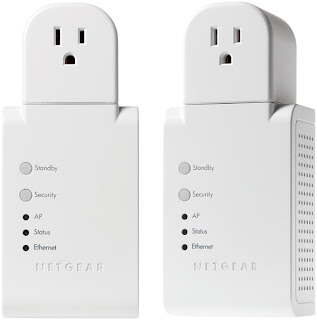
Netgear HDXB111 Powerline HD Plus Ethernet Adapter Kit


WiFi strength on my bottom floor isn't terribly strong (PS3 shows it between 35-45%), resulting in a choppy picture when I stream movies to my PS3 from my server upstairs (where the router and modem are located). I figured ethernet would be quicker, but drilling holes in the house wasn't an option. So I decided to try out the hdxb111, which uses the house's wiring to transmit the signal.

It comes with software which automatically detects the individual powerline units in range. I had a little trouble connecting the two, because of the security feature, but was able to solve that problem by turning the security off (not recommended by netgear).

Bottom line, the product worked pretty well, however, the signal still wasn't strong enough to stream my dvd rips (7gb a piece) mainly due to my house's old wiring (it was built in 1965). Newer houses should have better results.

Saturday, May 16, 2009

Streaming media from Windows Vista to the PS3

Took me a while to get this to work, but finally I did. This is what I did.

1. Turn on PS3

2. Open Windows Media Player 11 on my PC

3. Click on Library->Media Sharing, which will open the Media Sharing window (see image below)
ps3-media-stream-windows

4. In the window, check the "Share my media" box. Under that you should see "Unknown Device". This should be the playstation. (If you don't see it, reboot the playstation. Sometimes you have to reboot for them to see each other). Click "Unknown Device" and then click the "Allow" button. Click Ok.
**If "Share my Media" is greyed out, click on "Network Settings", and in the Network and Sharing window, next to your network name, click "customize" and check "private network".***

5. Back on the PS3, go to the XMB (XrossMediaBar), go to Music, Video, or Pics, and click "Search for media servers".

6. Once it finds the servers, you should see a windows Icon. (example below)
ps3-media-stream-windows

7. Here, you should be able to see your files.*


*I have found that in order for you to be able to see your media files, you need to put your media into the respective music/videos/picture folders. You can't even put them in sub-folders. Hopefully Sony will do something about this.


***UPDATE***

I just installed this:

Java PS3 Media Server for Windows and Linux | mirror

All I did was turn on the PS3, install it on my PC, and they automatically found each other. I added different drives (including my external drive), and it found everything. I can even play my ripped dvds in the VIDEO_TS folders. Flawless!

via: Dreaming Emotion